

Once self-hosted n8n handles dozens of webhooks per minute or runs heavy AI and spreadsheet workflows, a single container slows down the editor and stalls incoming triggers. This guide sets up n8n in queue mode on an Ubuntu 24.04 VPS with Docker Compose, splitting the main instance, a Redis queue broker, two workers with dedicated external task runners (n8nio/runners), PostgreSQL 18 and automatic HTTPS via Caddy.
On this page
- When to enable queue mode
- How the architecture fits together
- What you need
- Create the project folder and `.env` secrets
- Create the `Caddyfile`
- Build `docker-compose.yml` with Redis, workers and runners
- Start the stack and verify queue, workers and runners
- When to add a dedicated webhook processor
- Common queue mode errors
- Next steps
All environment variables, commands and defaults follow the official n8n 2.48.7 documentation (EXECUTIONS_MODE=queue, N8N_RUNNERS_MODE=external, OFFLOAD_MANUAL_EXECUTIONS_TO_WORKERS=true and QUEUE_HEALTH_CHECK_ACTIVE=true), building on our single-instance guide How to install n8n with Docker on a VPS.
When to enable queue mode
In default (regular) mode, one Node.js process serves the UI, receives webhooks, triggers schedules and runs every workflow node. When a heavy workflow blocks the event loop or spikes memory, the editor freezes and incoming webhooks time out.
In queue mode, the main instance accepts triggers, writes the execution record to PostgreSQL and pushes only the execution ID into Redis. Dedicated worker containers pull jobs in parallel and report results back through PostgreSQL and Redis:
- Stay on regular mode if you run a handful of light workflows per hour on a 4 GB or 8 GB VPS.
- Move to queue mode when webhooks lag during long executions, the editor stutters under load or you need parallel worker scaling.
| Automation workload | Recommended topology | vCPU | RAM | SSD |
|---|---|---|---|---|
| Light workflows and occasional webhooks | Regular mode (1 n8n + 1 runner) |
2–4 | 4–8 GB | 50–100 GB |
| Frequent webhooks (WhatsApp, CRM, AI agents) | Queue mode (1 main + 2 workers) |
6 | 12 GB | 200 GB |
| High bursts, Evolution API co-hosted or 4+ parallel workers | Queue mode + webhook processor | 8 | 24 GB | 300+ GB |
If you also host Evolution API or Coolify on the same server, see the full memory breakdown in How much RAM and vCPU for n8n, Evolution API and Coolify.
How the architecture fits together
In this layout, no database, Redis or worker port is published on the host. Only Caddy listens on ports 80 and 443; every other service communicates exclusively over the private Docker Compose network:
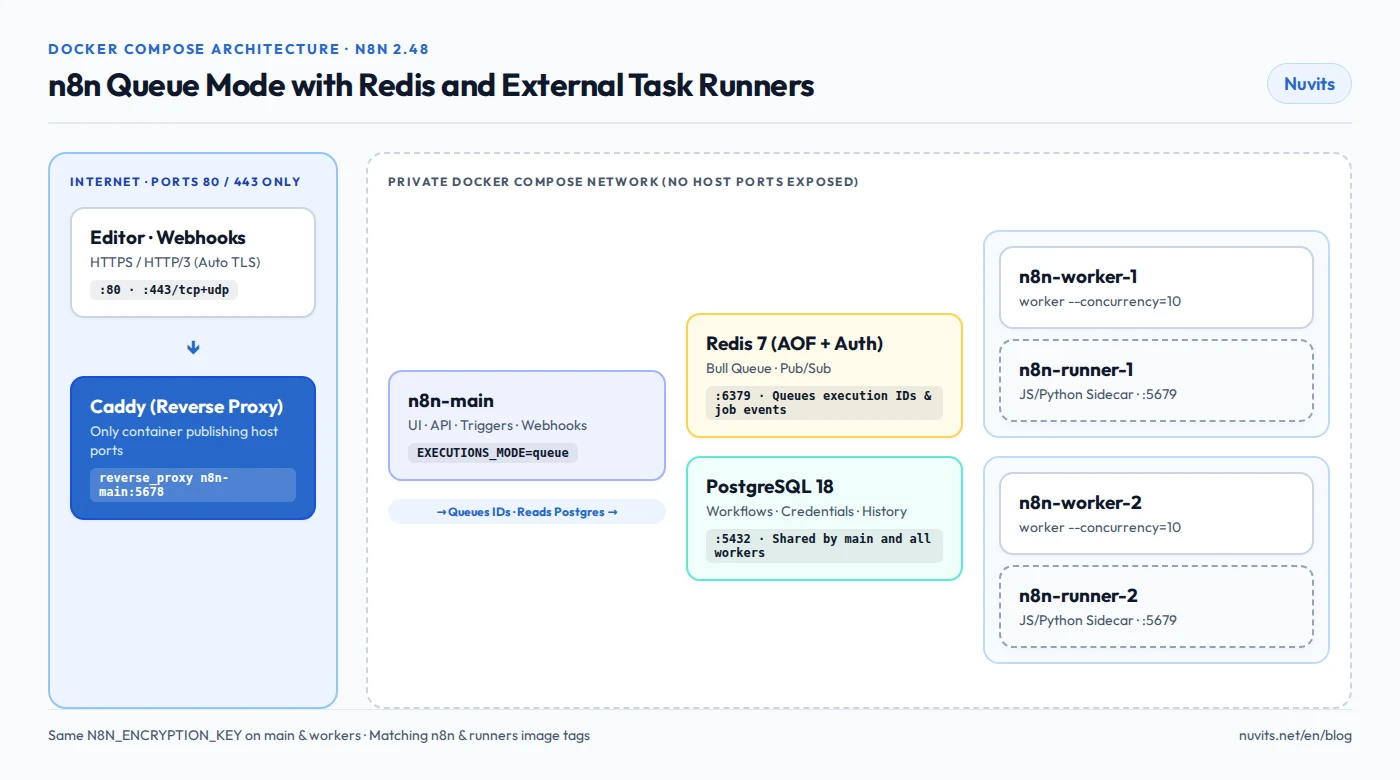
Three architectural choices prevent the most common n8n 2.x queue-mode pitfalls:
OFFLOAD_MANUAL_EXECUTIONS_TO_WORKERS=true: manual workflow runs are also queued to workers via Redis. That keepsmainlight for the editor, API, webhooks and timers without needing its ownn8nio/runnerssidecar.- One dedicated
n8nio/runnerssidecar per worker: per official n8n documentation, every worker runningN8N_RUNNERS_MODE=externalneeds its own runner container pointing tohttp://<worker-service>:5679with the matchingN8N_RUNNERS_AUTH_TOKEN. The image tag forn8nandrunnersmust match exactly. - Shared
N8N_ENCRYPTION_KEYacross all instances:mainand everyworkermust receive the exact same key so workers can decrypt credentials stored in PostgreSQL.
What you need
- An Ubuntu 24.04 64-bit VPS with Docker Engine and the Compose plugin (
v2.20+), plusufwallowing only SSH (22/tcp),80/tcpand443(TCP/UDP). - A subdomain with an
Arecord pointing to the VPS IPv4 address (n8n.example.comin the examples below). - An email address for Caddy's ACME certificate account.
If Docker is not installed yet, follow the preparation steps in How to install n8n with Docker on a VPS.
Create the project folder and .env secrets
Create a directory for the stack and generate four strong random secrets — for N8N_ENCRYPTION_KEY, N8N_RUNNERS_AUTH_TOKEN, POSTGRES_PASSWORD and REDIS_PASSWORD:
mkdir -p ~/n8n-queue && cd ~/n8n-queue
for i in 1 2 3 4; do openssl rand -hex 32; done
Save them in .env and lock down file permissions:
N8N_VERSION=2.48.7
N8N_DOMAIN=n8n.example.com
[email protected]
GENERIC_TIMEZONE=UTC

N8N_ENCRYPTION_KEY=paste-first-secret-here
N8N_RUNNERS_AUTH_TOKEN=paste-second-secret-here

POSTGRES_USER=n8n
POSTGRES_PASSWORD=paste-third-secret-here
POSTGRES_DB=n8n

REDIS_PASSWORD=paste-fourth-secret-here
WORKER_CONCURRENCY=10chmod 600 .envCreate the Caddyfile
Caddy provisions and renews TLS automatically and proxies HTTPS traffic to n8n-main:5678, with flush_interval -1 so streaming responses and editor events are never buffered:
{
	email {$ACME_EMAIL}
}

{$N8N_DOMAIN} {
	reverse_proxy n8n-main:5678 {
		flush_interval -1
	}
}
Build docker-compose.yml with Redis, workers and runners
This Compose file uses a YAML anchor (x-n8n-common) so n8n-main, n8n-worker-1 and n8n-worker-2 share the exact same image tag, PostgreSQL connection, Redis broker, encryption key, pruning settings and external task runner configuration:
x-n8n-common: &n8n-common
  image: docker.n8n.io/n8nio/n8n:${N8N_VERSION}
  restart: always
  environment:
    - N8N_HOST=${N8N_DOMAIN}
    - N8N_PORT=5678
    - N8N_PROTOCOL=https
    - N8N_WEBHOOK_URL=https://${N8N_DOMAIN}/
    - N8N_PROXY_HOPS=1
    - N8N_ENCRYPTION_KEY=${N8N_ENCRYPTION_KEY}
    - N8N_ENFORCE_SETTINGS_FILE_PERMISSIONS=true
    - GENERIC_TIMEZONE=${GENERIC_TIMEZONE}
    - TZ=${GENERIC_TIMEZONE}
    - DB_TYPE=postgresdb
    - DB_POSTGRESDB_HOST=postgres
    - DB_POSTGRESDB_PORT=5432
    - DB_POSTGRESDB_DATABASE=${POSTGRES_DB}
    - DB_POSTGRESDB_USER=${POSTGRES_USER}
    - DB_POSTGRESDB_PASSWORD=${POSTGRES_PASSWORD}
    - EXECUTIONS_MODE=queue
    - OFFLOAD_MANUAL_EXECUTIONS_TO_WORKERS=true
    - QUEUE_BULL_REDIS_HOST=redis
    - QUEUE_BULL_REDIS_PORT=6379
    - QUEUE_BULL_REDIS_PASSWORD=${REDIS_PASSWORD}
    - QUEUE_HEALTH_CHECK_ACTIVE=true
    - N8N_GRACEFUL_SHUTDOWN_TIMEOUT=30
    - N8N_RUNNERS_MODE=external
    - N8N_RUNNERS_AUTH_TOKEN=${N8N_RUNNERS_AUTH_TOKEN}
    - N8N_RUNNERS_BROKER_LISTEN_ADDRESS=0.0.0.0
    - EXECUTIONS_DATA_PRUNE=true
    - EXECUTIONS_DATA_MAX_AGE=168
    - EXECUTIONS_DATA_PRUNE_MAX_COUNT=20000
  depends_on:
    postgres:
      condition: service_healthy
    redis:
      condition: service_healthy

services:
  caddy:
    image: caddy:2.11
    restart: unless-stopped
    ports:
      - "80:80"
      - "443:443"
      - "443:443/udp"
    environment:
      - N8N_DOMAIN=${N8N_DOMAIN}
      - ACME_EMAIL=${ACME_EMAIL}
    volumes:
      - ./Caddyfile:/etc/caddy/Caddyfile:ro
      - caddy_data:/data
      - caddy_config:/config
    depends_on:
      - n8n-main

  postgres:
    image: postgres:18
    restart: always
    environment:
      - POSTGRES_USER=${POSTGRES_USER}
      - POSTGRES_PASSWORD=${POSTGRES_PASSWORD}
      - POSTGRES_DB=${POSTGRES_DB}
      - PGDATA=/var/lib/postgresql/data
    volumes:
      - db_storage:/var/lib/postgresql/data
    healthcheck:
      test: ["CMD-SHELL", "pg_isready -h localhost -U ${POSTGRES_USER} -d ${POSTGRES_DB}"]
      interval: 5s
      timeout: 5s
      retries: 10

  redis:
    image: redis:7-alpine
    restart: always
    environment:
      - REDIS_PASSWORD=${REDIS_PASSWORD}
      - REDISCLI_AUTH=${REDIS_PASSWORD}
    command: ["sh", "-c", 'exec redis-server --appendonly yes --requirepass "$$REDIS_PASSWORD"']
    volumes:
      - redis_storage:/data
    healthcheck:
      test: ["CMD", "redis-cli", "ping"]
      interval: 5s
      timeout: 5s
      retries: 10

  n8n-main:
    <<: *n8n-common
    volumes:
      - n8n_data:/home/node/.n8n
    healthcheck:
      test: ["CMD-SHELL", "wget -qO- http://127.0.0.1:5678/healthz || exit 1"]
      interval: 10s
      timeout: 5s
      retries: 10

  n8n-worker-1:
    <<: *n8n-common
    command: ["worker", "--concurrency=${WORKER_CONCURRENCY}"]
    healthcheck:
      test: ["CMD-SHELL", "wget -qO- http://127.0.0.1:5678/healthz/readiness || exit 1"]
      interval: 10s
      timeout: 5s
      retries: 10

  n8n-runner-1:
    image: n8nio/runners:${N8N_VERSION}
    restart: always
    environment:
      - N8N_RUNNERS_AUTH_TOKEN=${N8N_RUNNERS_AUTH_TOKEN}
      - N8N_RUNNERS_TASK_BROKER_URI=http://n8n-worker-1:5679
    depends_on:
      n8n-worker-1:
        condition: service_healthy

  n8n-worker-2:
    <<: *n8n-common
    command: ["worker", "--concurrency=${WORKER_CONCURRENCY}"]
    healthcheck:
      test: ["CMD-SHELL", "wget -qO- http://127.0.0.1:5678/healthz/readiness || exit 1"]
      interval: 10s
      timeout: 5s
      retries: 10

  n8n-runner-2:
    image: n8nio/runners:${N8N_VERSION}
    restart: always
    environment:
      - N8N_RUNNERS_AUTH_TOKEN=${N8N_RUNNERS_AUTH_TOKEN}
      - N8N_RUNNERS_TASK_BROKER_URI=http://n8n-worker-2:5679
    depends_on:
      n8n-worker-2:
        condition: service_healthy

volumes:
  caddy_data:
  caddy_config:
  db_storage:
  redis_storage:
  n8n_data:
Key details in this configuration:
- No
N8N_RUNNERS_ENABLED: deprecated since n8n 2.0; settingN8N_RUNNERS_MODE=externalenables external task runners cleanly without deprecation warnings. QUEUE_HEALTH_CHECK_ACTIVE=true: exposes/healthzand/healthz/readinesson port5678inside each worker./healthz/readinessonly returns200once both PostgreSQL and Redis connections are healthy, so eachn8n-runner-*waits for its worker before connecting.--concurrency=10: n8n's default. Official guidance recommends keeping concurrency at 5 or higher — spinning up many low-concurrency workers can exhaust PostgreSQL's connection pool.- Password-protected, private Redis:
REDISCLI_AUTHlets the healthcheck runredis-cli pingcleanly without leaking the password in warnings, and--appendonly yespersists queued jobs across restarts.
Start the stack and verify queue, workers and runners
Validate the Compose YAML first, then start all containers:
cd ~/n8n-queue
sudo docker compose config --quiet
sudo docker compose up -d
sudo docker compose ps
Verify four things right after startup:
1. Health of main and workers
Confirm postgres, redis, n8n-main, n8n-worker-1 and n8n-worker-2 report Up (healthy) in docker compose ps, then check external HTTPS:
curl -fsS https://n8n.example.com/healthz2. External task runner connections
Check the runner logs to confirm each sidecar connected to its worker's task broker without authentication errors:
sudo docker compose logs --tail=30 n8n-runner-1 n8n-runner-2You should see the launcher starting the JavaScript and Python runners and connecting to http://n8n-worker-1:5679 and http://n8n-worker-2:5679.
3. Live execution flowing through Redis
Open https://n8n.example.com, create a small workflow with a Webhook (or Manual Trigger) connected to a Code node returning { ok: true, host: $env.HOSTNAME }, and trigger it a few times while tailing both workers:
sudo docker compose logs -f n8n-worker-1 n8n-worker-2In a second SSH session, confirm Bull queue keys exist in Redis:
sudo docker compose exec redis redis-cli KEYS "bull:*"When executions show up in n8n-worker-1 or n8n-worker-2 (instead of running on n8n-main) and the Code node succeeds, queue mode and external task runners are working end to end.
4. Exposed host ports
Verify only 80 and 443 are bound on the host:
sudo ss -tulpn | grep -E ':(80|443|5432|5678|5679|6379)\b'If 5432, 5678, 5679 or 6379 appears on 0.0.0.0, remove any accidental ports: mapping. See why in Docker port still open with ufw.
When to add a dedicated webhook processor
If your bottleneck is incoming HTTP volume rather than workflow execution time (for example, dozens of Evolution API instances firing WhatsApp webhooks simultaneously), add a dedicated webhook processor container:
- Add an
n8n-webhookservice reusing<<: *n8n-commonwithcommand: ["webhook"]. - Set
N8N_DISABLE_PRODUCTION_MAIN_PROCESS=trueonn8n-mainso the editor process stops competing with production webhook traffic. - Update
Caddyfileto route/webhook/*and/webhook-waiting/*ton8n-webhook:5678, while keeping/webhook-test/*and all UI/API routes onn8n-main:5678:
{$N8N_DOMAIN} {
	@prod_webhooks path /webhook/* /webhook-waiting/*
	handle @prod_webhooks {
		reverse_proxy n8n-webhook:5678 {
			flush_interval -1
		}
	}
	handle {
		reverse_proxy n8n-main:5678 {
			flush_interval -1
		}
	}
}Common queue mode errors
- Code node hangs on "Waiting for task runner" or times out: a worker is missing its
n8nio/runnerssidecar,N8N_RUNNERS_BROKER_LISTEN_ADDRESS=0.0.0.0was omitted on the worker, or then8nio/runnerstag does not matchN8N_VERSION. Credentials could not be decryptedon workers: a worker started with a differentN8N_ENCRYPTION_KEYthann8n-main(or without the variable set).- Executions stay stuck in "Queued": check that workers are running (
docker compose ps),QUEUE_BULL_REDIS_PASSWORDmatches Redis, and Redis has not hit its memory limit. The response is too large to be sent back from the worker: for Respond to Webhook workflows, workers relay responses back tomainvia Redis (default limitN8N_WEBHOOK_RESPONSE_RELAY_SIZE_MAX=64MiB). On n8n 2.34+, enableN8N_WEBHOOK_RESPONSE_RELAY_OFFLOAD_ENABLED=trueon workers alongside shared binary storage (database,s3orazure).- PostgreSQL rejects connections (
too many clients already): too many worker containers are competing for PostgreSQL connections. Reduce worker count and prefer 2 or 3 workers with--concurrency=10.
Next steps
- Automate daily off-site backups of PostgreSQL and
.envwith Automatic off-site n8n backups. - If webhook URLs still display
localhost:5678behind your proxy, see n8n webhook URL shows localhost:5678. - To compare server tiers with room for Redis and multiple workers, check n8n VPS and Docker VPS.