
n8n's Webhook node, behind a proxy, shows the production URL as http://localhost:5678/webhook/.... An outside service that receives that address calls its own machine, where localhost:5678 is not your n8n, and the event never arrives.
The test ran on 19 November 2026 with n8n 2.48.6 (docker.n8n.io/n8nio/n8n:2.48.6) and Caddy 2.11.9 in front, on Ubuntu 24.04. n8n used PostgreSQL 18.7 and the runner n8nio/runners:2.48.6. The proxy was the same one as in n8n and Evolution API on the same VPS. Each block below is a separate start, with the rest of the Compose file unchanged.
What the editor shows
Without N8N_HOST, N8N_PROTOCOL, N8N_WEBHOOK_URL and N8N_PROXY_HOPS, the startup log was:
Editor is now accessible via:
http://localhost:5678
After the owner account existed, GET /rest/settings returned urlBaseWebhook and urlBaseEditor as http://localhost:5678/. The Webhook node, published with the path whatsapp, showed the production URL http://localhost:5678/webhook/whatsapp:
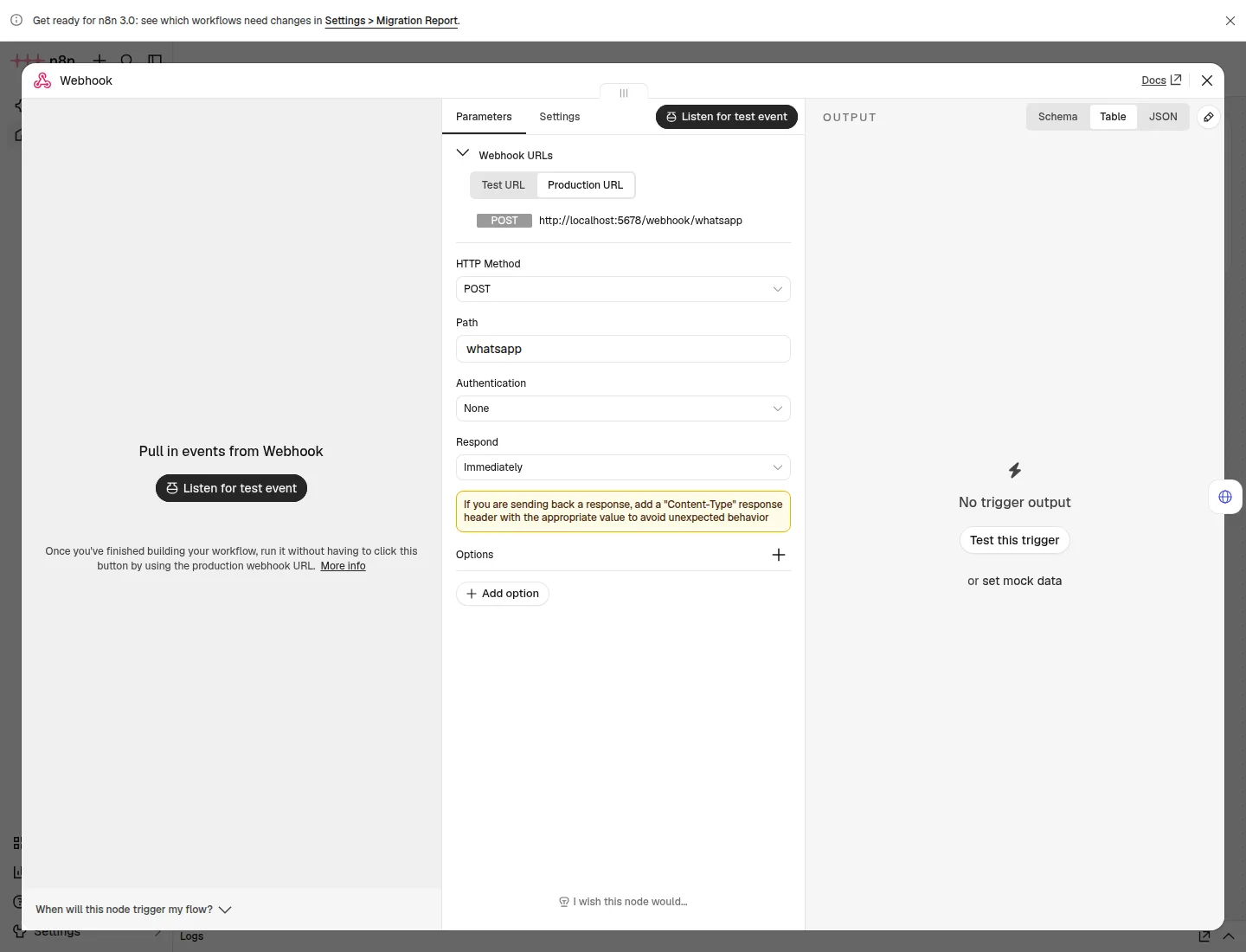
The site itself opened at https://n8n.example.com. The proxy was fine. The URL n8n builds for the webhook is a separate calculation, made from variables, not from the address the browser used.
Why port 5678 lands in the URL
The n8n docs describe how the URL is built: without a webhook URL set, n8n joins N8N_PROTOCOL, N8N_HOST and N8N_PORT. The defaults are http, localhost and 5678. The proxy publishes 443. The process keeps listening on 5678. The two ends do not match.
On n8n 2.48.6, measuring one variable at a time gave this. The value is the authenticated urlBaseWebhook:
| Variables | urlBaseWebhook |
|---|---|
| none | http://localhost:5678/ |
N8N_HOST=n8n.example.com and N8N_PROTOCOL=https |
https://n8n.example.com:5678/ |
those two plus N8N_WEBHOOK_URL=https://n8n.example.com/ |
https://n8n.example.com/ |
those three plus N8N_PROXY_HOPS=1 |
https://n8n.example.com/ |
N8N_HOST and N8N_PROTOCOL change the name and the scheme, and port 5678 stays. N8N_WEBHOOK_URL is what removes the port. The trailing slash matters: the tested value was https://n8n.example.com/, and the node URL became https://n8n.example.com/webhook/whatsapp.
N8N_PROXY_HOPS does not change that string. It turns on Express trust proxy for that many proxies. With Caddy sending X-Forwarded-For and hops left at zero, the n8n 2.48.6 log was:
ValidationError: The 'X-Forwarded-For' header is set but the Express 'trust proxy' setting is false (default). This could indicate a misconfiguration which would prevent express-rate-limit from accurately identifying users.With N8N_PROXY_HOPS=1, the same request through Caddy did not produce that line. The webhook execution then recorded x-forwarded-proto as https. One proxy means the value is 1. Two proxies in a row means the value is 2, which this test did not build.
N8N_WEBHOOK_URL has existed since n8n 2.30.0. The old variable WEBHOOK_URL still works on 2.48.6 and also produces https://n8n.example.com/, but startup warns:
WEBHOOK_URL -> Use N8N_WEBHOOK_URL instead, which sets the base URL for both test and production webhooks.The docs mark WEBHOOK_URL deprecated from 2.35.0. Use the new name.
The fix
On the n8n service in Compose, the four lines that were tested:
services:
  n8n:
    environment:
      - N8N_HOST=${N8N_DOMAIN}
      - N8N_PROTOCOL=https
      - N8N_WEBHOOK_URL=https://${N8N_DOMAIN}/
      - N8N_PROXY_HOPS=1
N8N_DOMAIN in .env is only the host, n8n.example.com, with no scheme and no port. Recreate the container. A process that is already running does not pick up new environment variables:
cd ~/whatsapp
sudo docker compose up -d n8n
sudo docker compose logs n8n
The log then says:
Editor is now accessible via:
https://n8n.example.com
Caddy in this test used an internal certificate. curl trusts the root Caddy wrote:
sudo docker compose cp caddy:/data/caddy/pki/authorities/local/root.crt ./caddy-root.crt
curl --cacert ./caddy-root.crt -fsS https://n8n.example.com/healthz
With a public certificate, drop --cacert ./caddy-root.crt. Health answers {"status":"ok"}.
How to check
In the editor, open the Webhook node and the Production URL tab. The address starts with https:// and the domain, and it has no :5678.
Through the API, after login, GET /rest/settings returns urlBaseWebhook equal to https://n8n.example.com/. That is the field used in the table above.
Publish the workflow and call the production URL through the proxy. In the test, with the path whatsapp:
curl --cacert ./caddy-root.crt -fsS -X POST https://n8n.example.com/webhook/whatsapp \
  -H "Content-Type: application/json" \
  -d '{"event":"messages.upsert","data":{"message":{"conversation":"oi do teste"}}}'
The response was {"message":"Workflow was started"}. In the execution, webhookUrl was https://n8n.example.com/webhook/whatsapp. If the response is 404 saying the webhook is not registered, the workflow is not published. The right URL with the workflow still a draft still receives nothing.
The same symptom, with the right variable already in Compose, is handled in n8n and Evolution API on the same VPS. A from-scratch install, with Postgres and the runner, is in How to install n8n with Docker on a VPS. The VPS that n8n runs on is at VPS for n8n.