

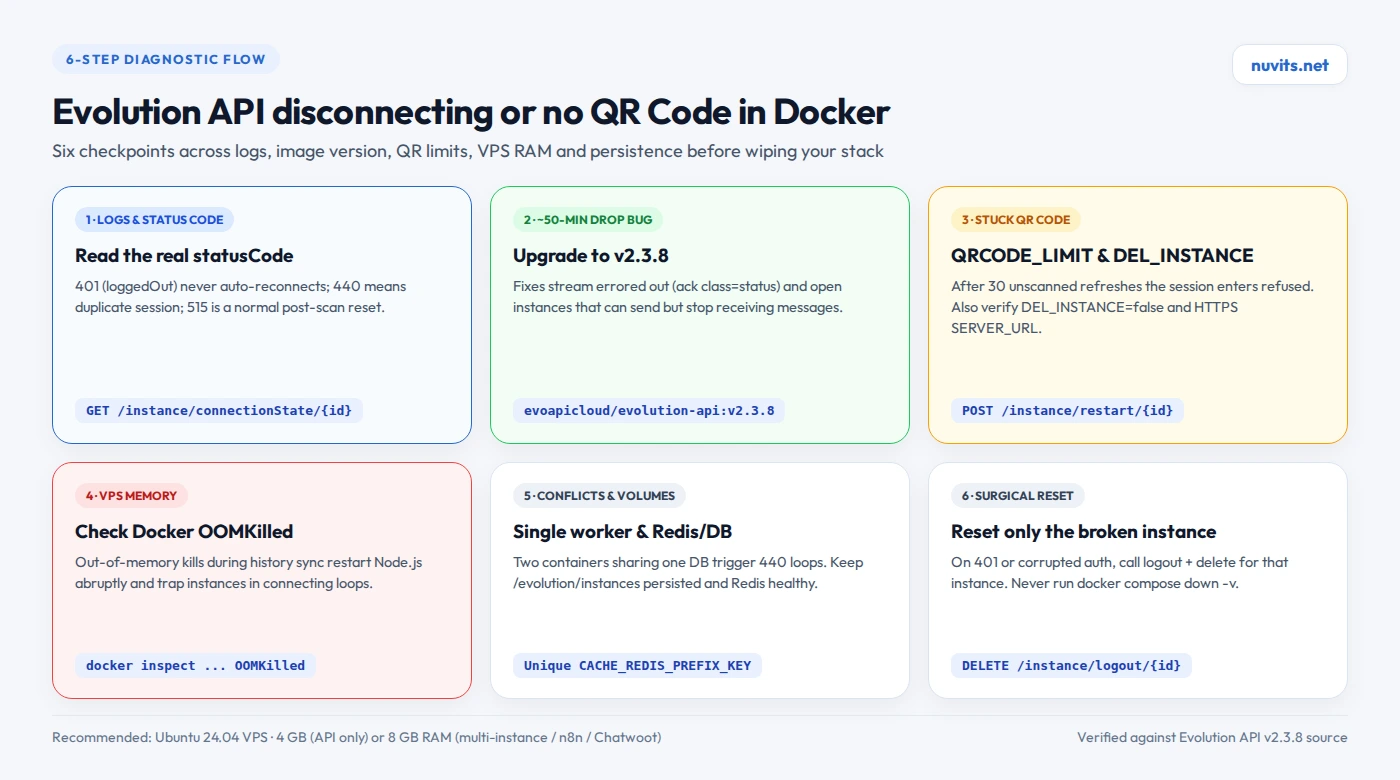
When Evolution API in Docker refuses to generate a QR Code, stays stuck in connecting or silently drops your WhatsApp session hours after pairing, the root cause almost always lands in one of six places: an outdated image (including the ~50-minute stream errored out bug fixed in v2.3.8), hitting the QR retry limit, duplicate session workers, broken volume/cache persistence or OOMKilled restarts on an under-provisioned VPS.
On this page
- 1. Read the actual disconnect code from the API and logs
- 2. Upgrade to `v2.3.8` if instances drop every 50 minutes or stop receiving
- 3. QR Code fails to load or hits `refused` (`QRCODE_LIMIT`)
- 4. Check for `OOMKilled` restarts and VPS memory pressure
- 5. Fix session conflicts (`440`) and broken volume persistence
- 6. Reset a single broken session without wiping the whole stack
- Two-minute triage table
- Next steps
Every status code, environment variable and endpoint below is verified directly against the upstream Evolution API v2.3.8 source (whatsapp.baileys.service.ts, env.config.ts and instance.router.ts).
1. Read the actual disconnect code from the API and logs
Before deleting instances or rebuilding your stack, inspect the live connection state and recent container logs:
curl -fsS https://api.example.com/instance/connectionState/your-instance \
-H "apikey: $EVOLUTION_API_KEY"sudo docker compose logs --tail=120 api | grep -iE "disconnect|statusCode|stream errored|qrcode|limit|401|405|408|440|515"Inside whatsapp.baileys.service.ts, Evolution API decides whether to reconnect based on the Baileys statusCode:
| Log code / symptom | What it actually means | Auto-reconnects? | Fix |
|---|---|---|---|
stream errored out (~50 min) or silent open |
Missing <status> stanza ack in Baileys 7.0.0-rc.9 |
Unstable | Upgrade image to evoapicloud/evolution-api:v2.3.8 |
401 (loggedOut) |
Session revoked on phone or corrupted auth state | No | Run DELETE /instance/logout/{instance} and scan a new QR |
440 (connectionReplaced) |
Two containers/processes using the same session or database | Yes (in a loop) | Stop the duplicate container and isolate CACHE_REDIS_PREFIX_KEY |
515 (restartRequired) |
Expected socket reset right after scanning the QR Code | Yes | Wait 5–10 s; if it dies, check RAM (OOMKilled) |
408 (timedOut) / 428 (connectionClosed) |
Network blip, stuck DNS or CPU/RAM starvation on the VPS | Yes | Check docker inspect (OOM), DNS and Redis health |
QR code limit reached (state: refused) |
Exceeded QRCODE_LIMIT (default 30) without a scan |
No (endSession) |
Call POST /instance/restart/{instance} or recreate session |
2. Upgrade to v2.3.8 if instances drop every 50 minutes or stop receiving
If an instance reports open and can still send messages, yet stops receiving inbound messages (or disconnects with stream errored out and ack class="status" roughly every 50 minutes), you are hitting the exact Baileys bug patched in v2.3.8.
Older builds can also fail the WhatsApp Web handshake and never emit a QR Code. Release v2.3.8 fetches the current WhatsApp Web version automatically via fetchLatestWaWebVersion and includes the status-stanza patch out of the box.
Upgrade in place while keeping active sessions intact (no need to re-scan the QR Code):
cd ~/evolution
# pin image: evoapicloud/evolution-api:v2.3.8 in docker-compose.yml
sudo docker compose pull api
sudo docker compose up -d api
sudo docker compose logs -f --tail=80 api
3. QR Code fails to load or hits refused (QRCODE_LIMIT)
When nobody scans the QR Code within QRCODE_LIMIT refreshes (default 30 in env.config.ts), Evolution API sets endSession = true, emits QR code limit reached, please login again and stops generating codes.
Run through three checks:
- Restart the instance and request a fresh QR Code:
curl -fsS -X POST https://api.example.com/instance/restart/your-instance \
  -H "apikey: $EVOLUTION_API_KEY"

curl -fsS https://api.example.com/instance/connect/your-instance \
-H "apikey: $EVOLUTION_API_KEY"- Check
DEL_INSTANCEin.env:DEL_INSTANCE=falsekeeps unpaired instances around until you connect them. Setting it to a low minute count (such as5) automatically deletes disconnected instances while you are still setting up webhooks. - Check
SERVER_URLand reverse proxy WebSockets: ifcurlreturns the QR payload but the manager UI stays blank or never refreshes, verify thatSERVER_URLis set tohttps://api.example.com(no trailing slash, neverhttp://localhost:8080) and that your reverse proxy forwards WebSockets. With the Caddy setup from How to install Evolution API with Docker on a VPS, WebSockets work out of the box.
4. Check for OOMKilled restarts and VPS memory pressure
A frequent silent cause of drops is the Linux kernel killing the Evolution API Node.js process when the server runs out of RAM (OOMKilled). Docker restarts the container automatically (restart: always), leaving sessions stuck in connecting or looping.
Check in one command whether the container was OOM-killed or is restarting repeatedly:
sudo docker inspect --format 'OOMKilled={{.State.OOMKilled}} Restarts={{.RestartCount}} Status={{.State.Status}}' evolution_apiIf OOMKilled=true or Restarts keeps climbing:
- On a 2 GB VPS running Evolution API + PostgreSQL + Redis (especially alongside n8n or Chatwoot), memory spikes during history sync (
DATABASE_SAVE_DATA_HISTORIC=true) easily exceed available RAM. - Disable unused persistence flags in
.env(for exampleDATABASE_SAVE_DATA_HISTORIC=false) or move to an 8 GB RAM VPS when running multiple instances or companion tools. See the per-layer memory breakdown in How much RAM and vCPU for n8n, Evolution API and Coolify.
5. Fix session conflicts (440) and broken volume persistence
Two Docker mistakes wipe out otherwise healthy sessions overnight:
- Two API containers pointing at the same PostgreSQL or Redis: common when cloning a production
.envinto staging or deploying a new container in Coolify while the old one is still running. WhatsApp drops one socket with440 connectionReplaced, and both containers fight in an endless reconnect loop. Keep one API container per database and give each environment a uniqueCACHE_REDIS_PREFIX_KEY. - Missing volume persistence or running
docker compose down -v: without a named volume mounted at/evolution/instances(plusDATABASE_SAVE_DATA_INSTANCE=trueand healthy PostgreSQL/Redis), recreating the container wipes auth keys and forces a new QR Code.
Confirm PostgreSQL and Redis are both up and reachable:
sudo docker compose ps
sudo docker compose exec redis redis-cli ping
6. Reset a single broken session without wiping the whole stack
When one instance stays wedged after a 401 or failed pairing, clean up only that instance — never run docker compose down -v, which destroys the database and every other WhatsApp session on the VPS:
curl -fsS -X DELETE https://api.example.com/instance/logout/your-instance \
  -H "apikey: $EVOLUTION_API_KEY"

curl -fsS -X DELETE https://api.example.com/instance/delete/your-instance \
  -H "apikey: $EVOLUTION_API_KEY"
Then recreate it via POST /instance/create and scan the new QR Code from GET /instance/connect/your-instance.
Two-minute triage table
| Symptom | Where to check | Immediate fix |
|---|---|---|
Status open, sends ok, stops receiving (~50m) |
Image tag in docker-compose.yml |
Upgrade to evoapicloud/evolution-api:v2.3.8 |
QR Code stops loading (state: refused) |
Logs (QR code limit reached) |
POST /instance/restart/{instance} then /connect |
Reconnect loop with 440 connectionReplaced |
docker ps and CACHE_REDIS_PREFIX_KEY |
Stop duplicate container sharing the same DB/Redis |
Drops permanently with 401 loggedOut |
Linked Devices on phone + API logs | DELETE /instance/logout + delete, then scan fresh QR |
| Instance disappears before pairing | DEL_INSTANCE in .env |
Set DEL_INSTANCE=false and recreate api |
| Container restarts during traffic spikes | docker inspect (OOMKilled=true) |
Disable heavy history sync or upgrade to an 8 GB+ VPS |
Next steps
- Need a clean production Compose file with Caddy, PostgreSQL, Redis and persistent volumes? Follow How to install Evolution API with Docker on a VPS.
- If WhatsApp stays connected but your Typebot flow stays silent, read Evolution API Typebot bot not replying on WhatsApp.
- Looking for a Linux VPS with room for Evolution API, PostgreSQL and Redis without OOM restarts? Compare plans at Evolution API VPS.