

To run Coolify, n8n and Evolution API together on one Ubuntu VPS, the workable floor for light production is 4 vCPU and 8 GB of RAM (tight during Docker builds) and the balanced sweet spot is 6 vCPU, 12 GB of RAM and 200 GB of SSD. On a 4 GB VPS, the first Coolify build while WhatsApp webhooks are active usually triggers the Linux OOM killer and drops Evolution API or PostgreSQL.
On this page
The math adds up fast because you are not running three isolated binaries: each tool brings its own database, cache, reverse proxy and short CPU/memory spikes during deployments and concurrent executions.
Quick sizing summary by workload
Use this table as a direct reference before provisioning a server or upgrading an existing one:
| VPS workload | Typical containers | Workable floor | Recommended headroom | Recommended SSD |
|---|---|---|---|---|
| n8n only (with PostgreSQL and task runner) | 4 | 2 vCPU · 4 GB RAM | 4 vCPU · 8 GB RAM | 50–100 GB |
| Evolution API only (1–5 instances + Postgres + Redis) | 4 | 2 vCPU · 4 GB RAM | 4 vCPU · 8 GB RAM | 50–100 GB |
| n8n + Evolution API (plain Compose, no Coolify) | 6–7 | 4 vCPU · 8 GB RAM | 6 vCPU · 12 GB RAM | 100–200 GB |
| Coolify + n8n + Evolution API (initial production) | 10–12 | 4 vCPU · 8 GB RAM | 6 vCPU · 12 GB RAM | 200 GB |
| Coolify + n8n (queue mode) + 10+ Evolution instances | 13+ | 6 vCPU · 12 GB RAM | 8 vCPU · 24 GB RAM | 300 GB |
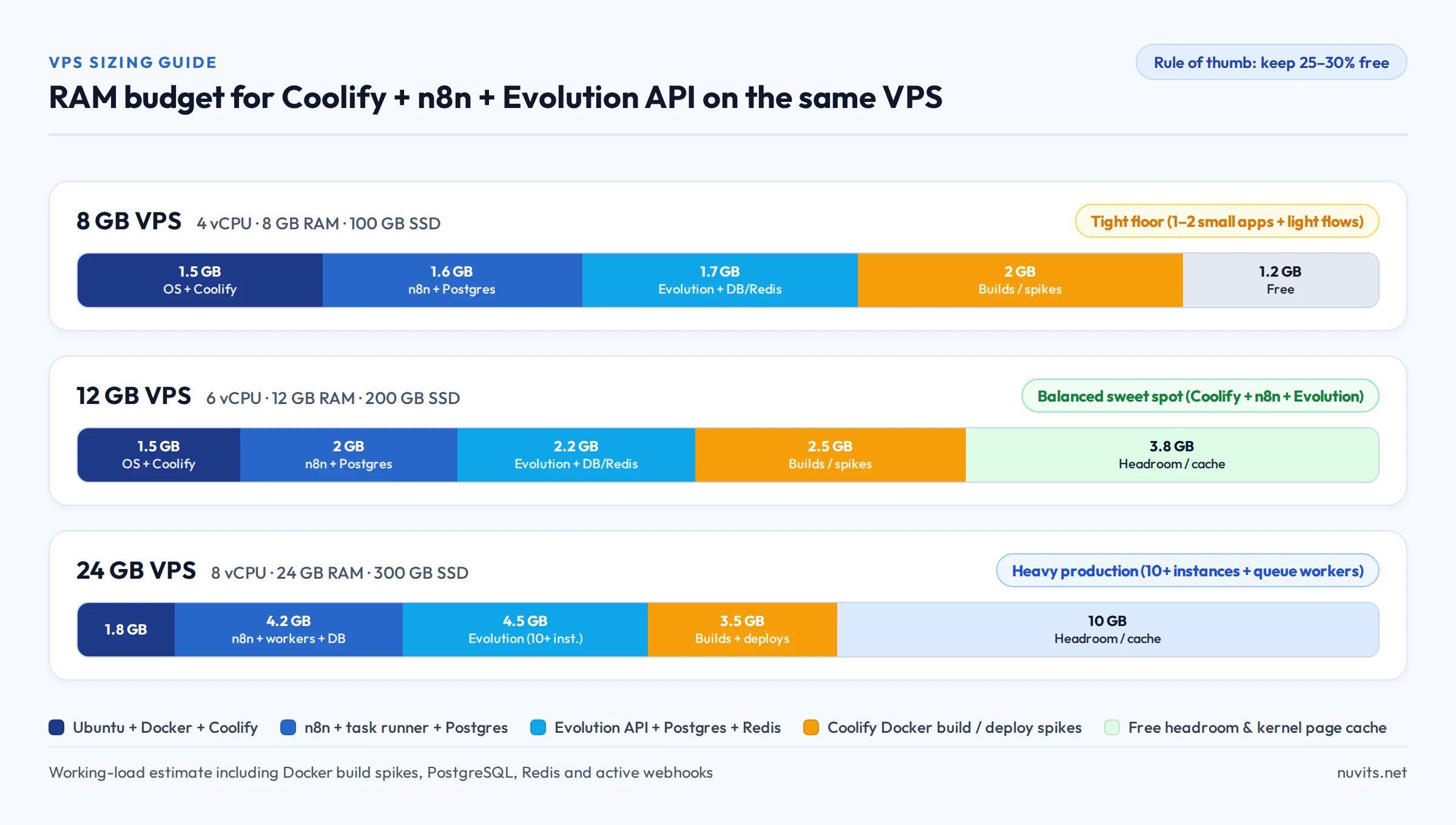
Real-world usage per stack layer
These numbers reflect a live stack with persistent data and active traffic rather than freshly booted empty containers:
| Layer / service | Idle RAM | Loaded or spike RAM | CPU profile | Main growth drivers |
|---|---|---|---|---|
| Ubuntu + Docker + proxy (Traefik or Caddy) | 400–600 MB | 700 MB | Low | Unrotated logs and high TLS concurrency |
| Coolify (panel + Postgres + Redis + Realtime/Soketi) | 800 MB–1.1 GB | 1.5 GB + builds | Medium (high during builds) | Parallel deployments, npm run build / bun build and old images |
| n8n + task runner + PostgreSQL | 600–900 MB | 1.8–3.5 GB | Medium to high | Large JSON payloads, spreadsheets, PDFs/binaries, parallel runs |
| Evolution API + PostgreSQL + Redis | 700 MB–1.0 GB | 1.8–4.0 GB | Medium | Connected WhatsApp instances, media attachments and event volume |
| Coolify Docker build (transient) | 0 MB | 1.5–3.0 GB | 2–4 vCPU for 1–3 min | Next.js/Vite, Laravel or multi-stage builds without concurrency caps |
Add the steady-state baseline for Coolify + n8n + Evolution API and you are already using 2.5 to 3.6 GB of RAM before triggering a single deploy or webhook burst.
Why 8 GB works, but requires discipline
On a 4 vCPU / 8 GB RAM VPS:
- The idle stack (~3 GB) leaves roughly 5 GB available.
- That comfortably handles 1 to 3 Evolution API instances, moderate n8n workflows and occasional Coolify deploys, as long as heavy builds do not overlap with memory-heavy workflows.
- Once you also deploy custom apps or APIs inside the same Coolify instance, 8 GB loses its safety buffer quickly.
Why 12 GB is the balanced sweet spot for all three
On a 6 vCPU / 12 GB RAM VPS:
- PostgreSQL retains healthy kernel page cache even while builds and webhooks overlap, keeping n8n responsive while Evolution API reconnects sessions.
- The 2 extra vCPUs (6 instead of 4) prevent a Coolify
docker buildfrom stalling incoming WhatsApp webhook responses. - 200 GB of SSD absorbs Docker image layers, n8n execution logs and WhatsApp media without filling the root disk in a few weeks.
Four traps that exhaust RAM and disk
- Unbounded n8n execution history: without automatic pruning (
EXECUTIONS_DATA_PRUNE=trueandEXECUTIONS_DATA_MAX_AGE), n8n's database grows continuously and slows down routine queries. - Uncapped Docker JSON logs: Docker's default
json-filedriver writes indefinitely to/var/lib/docker/containers/. Setmax-size: "10m"andmax-file: "3"in Compose ordaemon.json. - Accumulated Coolify build cache: every deploy leaves dangling image layers behind. Enable scheduled Docker cleanup in Coolify's server settings so the disk never hits 100%.
- No swap safety net or container limits: without a small swapfile (for instance 2 GB with
vm.swappiness=10) andmem_limitcaps on spiky containers, a single build surge kills PostgreSQL before alerts fire.
How to measure your current VPS in one minute
If your stack is already running and you want to check whether you need a larger tier or just better limits, run these four commands on the VPS:
# 1. Real usable memory (check "available", not "free")
free -h

# 2. Live usage per container
sudo docker stats --no-stream --format "table {{.Name}}\t{{.CPUPerc}}\t{{.MemUsage}}\t{{.MemPerc}}"

# 3. Check if the Linux kernel already killed any process for RAM
sudo dmesg -T | grep -i -E 'oom|killed process' | tail -n 20

# 4. Root disk usage and Docker footprint
df -h / && sudo docker system df
Clear signs your server is undersized for its current workload:
availableinfree -hstays below 15% of total RAM outside peak hours.dmesgshows anyOut of memory: Killed processline.- Load average in
uptimestays above the VPS vCPU count throughout business hours.
When to stay on one VPS vs. split across two
| Situation | Better option |
|---|---|
| Up to 5 WhatsApp instances, light/medium flows and a few deploys per week | One 12 GB VPS (or 8 GB without Coolify) keeps internal networking, backups and maintenance simple |
| Frequent heavy builds (Next.js, Rust, Java) alongside business-critical WhatsApp traffic | Split: one VPS for Coolify/builds and a second dedicated to n8n + Evolution API so builds never stall webhooks |
| 10+ Evolution API instances or n8n in queue mode with multiple workers | 24 GB VPS (8 vCPU) or move PostgreSQL / queue workers onto a dedicated server |
Next steps
- To run n8n and Evolution API without Coolify's overhead, follow n8n and Evolution API on the same VPS.
- To install Coolify without exposing its dashboard publicly, see How to install Coolify securely on an Ubuntu VPS.
- To compare server tiers by workload before picking a machine, browse n8n VPS, Evolution API VPS and Coolify VPS.