

Choosing a VPS billed in Brazilian reais (BRL) with Pix or boleto removes three recurring headaches for developers and businesses in Brazil: needing an international credit card, paying foreign-exchange spreads plus Brazilian IOF tax on every invoice, and dealing with unpredictable monthly costs whenever USD or EUR fluctuates. Still, paying in BRL alone is not enough — you also need to inspect renewal pricing, contract lock-in, server regions and actual hardware specs.
On this page
This checklist walks through the six factors to verify before paying your first month.
BRL billing via Pix vs USD/EUR international card billing
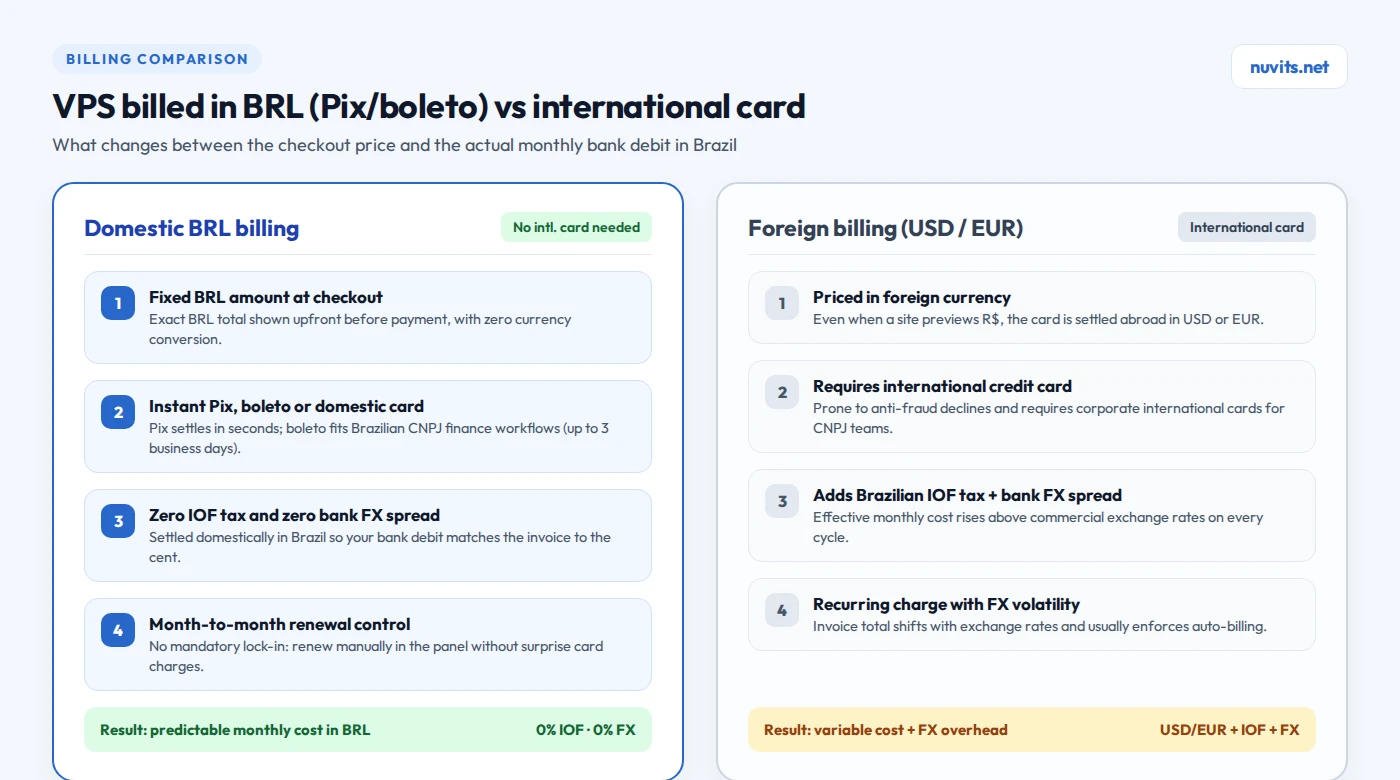
When you order directly from a foreign cloud provider, the sticker price rarely matches what leaves your Brazilian bank account. Here is how the two billing models compare in practice:
| Criterion | VPS billed in BRL (Pix / boleto / local card) | VPS billed in USD or EUR (international credit card) |
|---|---|---|
| International card required? | No (Pix and boleto work with any Brazilian bank) | Yes on almost all global cloud providers |
| IOF tax & bank FX spread | None (domestic BRL charge) | Subject to cross-border IOF tax + bank FX markup |
| Monthly cost predictability | Exact BRL amount shown before checkout | Changes every month with USD or EUR exchange rates |
| Provisioning speed | Instant on Pix; up to 3 business days on boleto | Instant on card, unless flagged by anti-fraud checks |
| Company (CNPJ) procurement | Straightforward via Pix or boleto from finance | Requires corporate international card and FX bookkeeping |
| Renewal control | Easy to run without mandatory recurring card charge | Typically tied to automatic recurring credit card billing |
Six-point checklist before ordering
Run through these six checks on any provider before paying a Pix code or boleto slip:
1. Real month-to-month rate vs 12-to-48-month lock-in
Many landing pages advertise a low monthly headline rate that only applies if you prepay 12, 24 or 48 months upfront. Always verify:
- The true month-to-month price with no long-term lock-in;
- The renewal price after the first billing cycle (watch for intro discounts that jump sharply on renewal);
- Whether any hidden setup fee appears on the final checkout screen.
2. Optional vs mandatory auto-renewal
If you are launching a new project, testing a client environment or keeping tight monthly budget control, look for optional auto-renewal. Being able to see your exact expiration date in the dashboard and manually renew via Pix, boleto or local card gives you clean control with zero surprise charges.
3. Real hardware per unit of cost (price per GB of RAM)
The cleanest way to compare two VPS plans is to divide the true monthly price by RAM and verify vCPU and SSD/NVMe storage:
- 2 to 4 GB RAM: a single website, small API, staging server or lightweight n8n / Evolution API instance.
- 8 GB RAM: production apps with PostgreSQL + Redis, multi-container Docker Compose stacks (such as n8n + Evolution API or Chatwoot) or an entry-level Windows VPS.
- 12 to 24 GB RAM: queued automation stacks (n8n queue mode), Coolify hosting multiple projects or larger databases.
If you are unsure how much capacity your container stack needs, read How much RAM and vCPU for n8n, Evolution API and Coolify or try our VPS assistant.
4. Server region and latency trade-offs
Paying in Brazilian reais does not mean the datacenter must physically sit in São Paulo — and local Brazilian datacenters often carry much higher hardware costs per gigabyte of RAM:
- US East and Europe datacenters: usually deliver significantly more RAM and SSD for the same BRL budget, performing smoothly for APIs, WhatsApp webhooks, n8n workflows, Chatwoot helpdesks, blogs and back-office tools.
- When proximity matters most: if your workload is ultra-sensitive to round-trip latency from Brazil (real-time gaming, VoIP or brokerage-linked trading terminals), check the available regions and test latency to your target endpoints before deploying.
5. What is included vs what stays on your side
An unmanaged VPS hands you a clean OS with root/SSH (Linux) or RDP (Windows) and a public IPv4 address. Check three details up front:
- Monthly traffic allowance: verify you have a generous monthly bandwidth allocation without surprise overage bills.
- OS licensing (for Windows VPS): confirm Windows Server is fully licensed rather than a 180-day evaluation image. See Linux VPS vs Windows VPS for a full breakdown.
- Off-server backups: most cost-effective VPS tiers do not include external backups by default — set up automated off-server backups on day one.
6. Confirmation speed by payment method
| Payment method | Typical confirmation time | Best fit |
|---|---|---|
| Pix | Seconds | Spinning up a VPS today or renewing right before expiration |
| Boleto | Up to 3 business days | Companies (CNPJ) paying through corporate finance workflows |
| Domestic card | Instant upon approval | Consolidating BRL expenses or splitting an annual plan |
Four common traps when shopping for a Pix VPS
- Chasing a steep first-month promo without checking renewal rates: always compare the regular monthly renewal rate, not just an introductory teaser.
- Missing a dedicated public IPv4 address: ultra-cheap plans sometimes ship with IPv6-only or shared NAT, which breaks webhooks, direct Caddy TLS certificates and standard SSH access.
- Confusing shared hosting with a VPS: shared web hosting does not let you run Docker, Evolution API, Chatwoot or custom background workers.
- Skipping off-server backups: once a prepaid billing cycle expires without renewal, the server disk is decommissioned after the grace period.
Next steps
- Compare transparent month-to-month plans sorted by price per GB of RAM on Cheap VPS.
- Explore Linux VPS and Docker VPS for self-hosted apps, or Windows VPS for RDP workloads.
- Want help sizing a server for your exact stack? Try the VPS assistant or read Linux VPS vs Windows VPS.