

Chatwoot brings WhatsApp, Instagram, email, live website chat and API inboxes into a single open-source customer support workspace. This guide deploys Chatwoot v4.20.1 on an Ubuntu 24.04 VPS with Docker Compose, pairing Rails, a Sidekiq worker, PostgreSQL 16 with pgvector, password-protected Redis and Caddy for automatic HTTPS — without exposing internal ports to the internet.
On this page
- How much RAM and CPU Chatwoot needs on a VPS
- Secure architecture with Docker and Caddy
- Prerequisites
- Create the project folder and generate secrets in `.env`
- Create the `Caddyfile`
- Write `docker-compose.yml`
- Prepare the database and start the stack
- Create the admin account and lock down sign-ups
- Connecting Chatwoot to Evolution API
- Backups and safe upgrades
- Common Docker troubleshooting
- Next steps
Every image, environment variable and command below matches the upstream docker-compose.production.yaml, .env.example and config/database.yml from Chatwoot release v4.20.1, hardened for single-server production.
How much RAM and CPU Chatwoot needs on a VPS
Unlike lightweight Go or Node.js apps, Chatwoot runs two persistent Ruby on Rails processes (rails for the web UI, API and ActionCable WebSockets, plus sidekiq for background jobs, mailers and attachment processing), alongside PostgreSQL with pgvector and Redis.
| Workload profile | vCPU | RAM | SSD Storage |
|---|---|---|---|
| Small support team (up to 5 agents, Chatwoot only) | 2–4 | 4 GB | 50–80 GB |
| Production headroom or Chatwoot + Evolution API | 4 | 8 GB | 100+ GB |
| Multiple inboxes, heavy media and n8n on the same host | 6 | 12 GB | 200+ GB |
At idle, the full Chatwoot stack already uses roughly 1.5 GB to 2.2 GB of RAM. If you plan to run Chatwoot alongside Evolution API (or n8n) on the same server, start at 8 GB of RAM so Sidekiq does not get killed during traffic bursts or media uploads.
Secure architecture with Docker and Caddy
In this layout, only Caddy binds ports 80 and 443 on the host. Rails (3000), PostgreSQL (5432) and Redis (6379) stay private on the Docker Compose network:
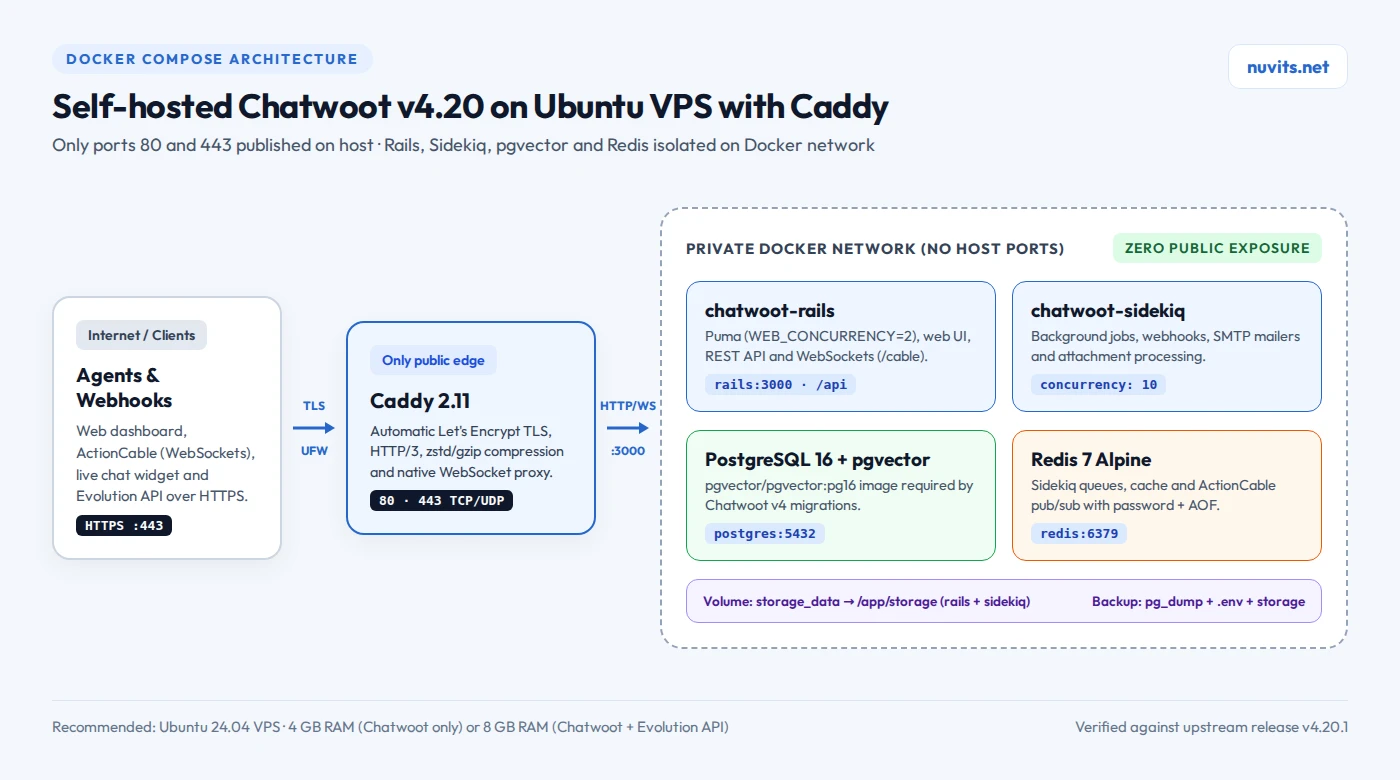
Four architectural details prevent common Chatwoot 4.x pitfalls:
pgvector/pgvector:pg16is required: Chatwoot v4+ migrations enable the PostgreSQLvectorextension. Using plainpostgres:16causesdb:chatwoot_prepareto fail.- Shared
storage_datavolume betweenrailsandsidekiq: withACTIVE_STORAGE_SERVICE=local, both the web container and Sidekiq must mount the same/app/storagevolume to store and process images, PDFs and audio clips. FORCE_SSL=falsewhen Caddy terminates TLS: Caddy redirects HTTP to HTTPS and sendsX-Forwarded-Proto: https. Turning onFORCE_SSL=truecan make internal healthchecks againsthttp://127.0.0.1:3000/apifail with redirect loops.- Set
ACTIVE_RECORD_ENCRYPTION_*keys on day one: Chatwoot relies on Rails Active Record Encryption for MFA/2FA and encrypted fields. Generating these keys up front avoids migration headaches later.
Prerequisites
- An Ubuntu 24.04 64-bit VPS with Docker Engine and the Compose plugin (
v2.20+), plusufwallowing only22/tcp,80/tcpand443(TCP/UDP). - A subdomain with a DNS
Arecord pointing to your VPS IPv4 (chat.example.comin the examples below). - A valid email for Caddy's ACME certificate and SMTP credentials (Resend, Amazon SES, Postmark or your own mail relay) for agent invitations and notifications.
If you still need to install Docker and configure the firewall, follow the server setup in How to install n8n with Docker on a VPS.
Create the project folder and generate secrets in .env
Create the stack directory and generate strong secrets. SECRET_KEY_BASE must be alphanumeric (hex without special characters), and the three Active Record Encryption keys can each be 32-byte hex values:
mkdir -p ~/chatwoot && cd ~/chatwoot
echo "SECRET_KEY_BASE=$(openssl rand -hex 64)"
echo "POSTGRES_PASSWORD=$(openssl rand -hex 24)"
echo "REDIS_PASSWORD=$(openssl rand -hex 24)"
echo "ACTIVE_RECORD_ENCRYPTION_PRIMARY_KEY=$(openssl rand -hex 32)"
echo "ACTIVE_RECORD_ENCRYPTION_DETERMINISTIC_KEY=$(openssl rand -hex 32)"
echo "ACTIVE_RECORD_ENCRYPTION_KEY_DERIVATION_SALT=$(openssl rand -hex 32)"
Write .env with the generated values and restrict permissions to your user:
CHATWOOT_VERSION=v4.20.1
CHATWOOT_DOMAIN=chat.example.com
[email protected]

FRONTEND_URL=https://chat.example.com
DEFAULT_LOCALE=en
FORCE_SSL=false
ENABLE_ACCOUNT_SIGNUP=true

SECRET_KEY_BASE=paste-secret-key-base-here
ACTIVE_RECORD_ENCRYPTION_PRIMARY_KEY=paste-primary-key-here
ACTIVE_RECORD_ENCRYPTION_DETERMINISTIC_KEY=paste-deterministic-key-here
ACTIVE_RECORD_ENCRYPTION_KEY_DERIVATION_SALT=paste-salt-here

POSTGRES_HOST=postgres
POSTGRES_PORT=5432
POSTGRES_DATABASE=chatwoot_production
POSTGRES_USERNAME=chatwoot
POSTGRES_PASSWORD=paste-postgres-password-here

REDIS_URL=redis://redis:6379
REDIS_PASSWORD=paste-redis-password-here

ACTIVE_STORAGE_SERVICE=local
RAILS_MAX_THREADS=5
WEB_CONCURRENCY=2
SIDEKIQ_CONCURRENCY=10

MAILER_SENDER_EMAIL=Support <[email protected]>
SMTP_DOMAIN=example.com
SMTP_ADDRESS=smtp.example.com
SMTP_PORT=587
SMTP_USERNAME=your-smtp-username
SMTP_PASSWORD=your-smtp-password
SMTP_AUTHENTICATION=login
SMTP_ENABLE_STARTTLS_AUTO=truechmod 600 .envCreate the Caddyfile
Caddy handles TLS certificates automatically and proxies both standard HTTP traffic and ActionCable WebSockets (/cable) straight to rails:3000:
{
	email {$ACME_EMAIL}
}

{$CHATWOOT_DOMAIN} {
	encode zstd gzip
	reverse_proxy rails:3000
}
Write docker-compose.yml
This Compose file pins v4.20.1, avoids publishing internal database or app ports to the host and wires healthchecks for PostgreSQL, Redis and Rails:
x-chatwoot-base: &chatwoot-base
  image: chatwoot/chatwoot:${CHATWOOT_VERSION}
  env_file: .env
  restart: always
  environment:
    - NODE_ENV=production
    - RAILS_ENV=production
    - INSTALLATION_ENV=docker
  volumes:
    - storage_data:/app/storage
  depends_on:
    postgres:
      condition: service_healthy
    redis:
      condition: service_healthy

services:
  caddy:
    image: caddy:2.11
    restart: unless-stopped
    ports:
      - "80:80"
      - "443:443"
      - "443:443/udp"
    environment:
      - CHATWOOT_DOMAIN=${CHATWOOT_DOMAIN}
      - ACME_EMAIL=${ACME_EMAIL}
    volumes:
      - ./Caddyfile:/etc/caddy/Caddyfile:ro
      - caddy_data:/data
      - caddy_config:/config
    depends_on:
      rails:
        condition: service_healthy

  postgres:
    image: pgvector/pgvector:pg16
    restart: always
    environment:
      - POSTGRES_DB=${POSTGRES_DATABASE}
      - POSTGRES_USER=${POSTGRES_USERNAME}
      - POSTGRES_PASSWORD=${POSTGRES_PASSWORD}
    volumes:
      - postgres_data:/var/lib/postgresql/data
    healthcheck:
      test: ["CMD-SHELL", "pg_isready -h localhost -U ${POSTGRES_USERNAME} -d ${POSTGRES_DATABASE}"]
      interval: 5s
      timeout: 5s
      retries: 15

  redis:
    image: redis:7-alpine
    restart: always
    environment:
      - REDIS_PASSWORD=${REDIS_PASSWORD}
      - REDISCLI_AUTH=${REDIS_PASSWORD}
    command: ["sh", "-c", 'exec redis-server --appendonly yes --requirepass "$$REDIS_PASSWORD"']
    volumes:
      - redis_data:/data
    healthcheck:
      test: ["CMD", "redis-cli", "ping"]
      interval: 5s
      timeout: 5s
      retries: 15

  rails:
    <<: *chatwoot-base
    entrypoint: docker/entrypoints/rails.sh
    command: ["bundle", "exec", "rails", "s", "-p", "3000", "-b", "0.0.0.0"]
    healthcheck:
      test: ["CMD-SHELL", "wget -qO- http://127.0.0.1:3000/api || exit 1"]
      interval: 15s
      timeout: 5s
      retries: 15
      start_period: 40s

  sidekiq:
    <<: *chatwoot-base
    command: ["bundle", "exec", "sidekiq", "-C", "config/sidekiq.yml"]

volumes:
  caddy_data:
  caddy_config:
  postgres_data:
  redis_data:
  storage_data:
Key details in this file:
- Explicit database name and user: Chatwoot's
config/database.ymldefaults tochatwoot_productionin production, while the upstream sample Compose file setsPOSTGRES_DB=chatwoot. Referencing${POSTGRES_DATABASE}on both sides preventsdatabase does not existerrors. WEB_CONCURRENCY=2for 4–8 GB VPS tiers: Puma runs 2 clustered workers with 5 threads each (RAILS_MAX_THREADS=5). On a 4 GB VPS shared with other containers, lower it toWEB_CONCURRENCY=1to save around 400 MB of RAM.- Redis persistence (
--appendonly yes): keeps Sidekiq queues intact across container restarts.
Prepare the database and start the stack
Validate the Compose syntax, start PostgreSQL and Redis first and run Chatwoot's official database setup task:
cd ~/chatwoot
sudo docker compose config --quiet
sudo docker compose up -d postgres redis
sudo docker compose run --rm rails bundle exec rails db:chatwoot_prepare
db:chatwoot_prepare creates the schema, enables pgvector, runs all migrations and seeds initial records. The first run typically takes 30 seconds to 2 minutes.
Once it completes without errors, start the remaining services:
sudo docker compose up -d
sudo docker compose ps
Create the admin account and lock down sign-ups
Verify that postgres, redis and rails report Up (healthy) and check the public HTTPS endpoint:
curl -fsS https://chat.example.com/apiYou should get a JSON payload with the Chatwoot version and service status. Next:
- Open
https://chat.example.comin your browser and register your primary administrator account. - Enable two-factor authentication inside your profile settings.
- Return to the VPS shell, switch
ENABLE_ACCOUNT_SIGNUP=falsein.envand recreate the app containers:
sed -i 's/^ENABLE_ACCOUNT_SIGNUP=true$/ENABLE_ACCOUNT_SIGNUP=false/' .env
sudo docker compose up -d rails sidekiq
Confirm that only ports 80 and 443 are listening publicly on the host:
sudo ss -tulpn | grep -E ':(80|443|3000|5432|6379)\b'If 3000, 5432 or 6379 shows up on 0.0.0.0, check for any stray ports: lines in your Compose file. See why this matters in Docker ports stay open with ufw.
Connecting Chatwoot to Evolution API
If you use Chatwoot as a WhatsApp helpdesk paired with Evolution API:
- In Chatwoot, generate an Access Token from your administrator profile (or create an API inbox directly).
- In Evolution API, enable the Chatwoot integration pointing to
https://chat.example.comwith yourAccount IDand access token, enabling contact/message import if desired. - If both stacks run on the same VPS, size the server at 8 GB of RAM or higher and back up both databases separately.
For a matching Docker + Caddy deployment of Evolution API, see How to install Evolution API on a VPS.
Backups and safe upgrades
Back up PostgreSQL, .env and attachments
A restorable Chatwoot backup requires three artifacts together: the PostgreSQL dump, the .env file (which holds SECRET_KEY_BASE and the Active Record Encryption keys) and the storage_data attachment volume:
cd ~/chatwoot
(umask 077
 sudo docker compose exec -T postgres pg_dump -U chatwoot -Fc chatwoot_production > chatwoot-db-$(date +%F).dump
 cp .env chatwoot-env-$(date +%F))
sudo docker run --rm -v chatwoot_storage_data:/data:ro -v "$PWD":/backup alpine tar czf /backup/chatwoot-storage-$(date +%F).tar.gz -C /data .
Copy all three files off the VPS regularly, or move attachments to S3-compatible object storage by setting ACTIVE_STORAGE_SERVICE=s3_compatible in .env.
Upgrade to a new release
- Take the backup above and read the changelog on Chatwoot releases.
- Update
CHATWOOT_VERSIONin.envto the target tag (for examplev4.20.2). - Pull the new image, run database preparation and restart the app containers:
cd ~/chatwoot
sudo docker compose pull rails sidekiq
sudo docker compose run --rm rails bundle exec rails db:chatwoot_prepare
sudo docker compose up -d rails sidekiq
Common Docker troubleshooting
PG::FeatureNotSupported: extension "vector" is not available: PostgreSQL started with the stockpostgres:16image instead ofpgvector/pgvector:pg16. Switch the image and recreate the empty database volume.- Messages do not update live in the dashboard: check that
FRONTEND_URLis exactlyhttps://chat.example.com(no trailing slash, nohttp://) and that your proxy forwards WebSockets (/cable). Caddy handles WebSockets out of the box with theCaddyfileabove. - Attachments fail to load or render broken thumbnails:
sidekiqis missing the sharedstorage_data:/app/storagemount, orFRONTEND_URLis still set tohttp://0.0.0.0:3000. - Agent invite emails never arrive:
SMTP_ADDRESSis empty, causing Rails to fall back to a localsendmailbinary that does not exist inside the container. Set up a transactional SMTP provider and inspectsudo docker compose logs --tail=50 sidekiq. - The
railscontainer restarts withOOMKilled: common on 2 GB servers or whenWEB_CONCURRENCYis set too high. LowerWEB_CONCURRENCY=1andSIDEKIQ_CONCURRENCY=5, or upgrade to a larger RAM tier.
Next steps
- Pair Chatwoot with WhatsApp using How to install Evolution API on a VPS.
- Automate routing and AI replies before handing off to human agents with n8n and Evolution API on the same VPS.
- Need a Linux server with enough headroom for Chatwoot, PostgreSQL and Redis? Compare plans on Docker VPS and Linux VPS.