

This guide runs Typebot and Evolution API on the same Ubuntu 24.04 VPS with Docker Compose and Caddy in front. Only Caddy publishes ports to the internet, with automatic HTTPS. Evolution API talks to the Typebot Viewer over the internal Compose network, keeping bot traffic off the public internet.
On this page
The configuration follows the upstream Typebot v3.19.1 repository and the Evolution API v2.3.7 source code, with pinned images for postgres:16.16, postgres:15.20, redis:7.4.12 and caddy:2.11.9. If you only need Evolution API or want n8n instead, see How to install Evolution API on a VPS and n8n and Evolution API on the same VPS.
What you need
- An Ubuntu 24.04 64-bit VPS with Docker Engine, the Compose plugin and SSH access with
sudo. - Three subdomains with
Arecords pointing to the VPS IPv4 address:builder.example.com(Typebot editor),bot.example.com(Typebot viewer) andapi.example.com(Evolution API). - An email address for Caddy's ACME account and an SMTP server (or Google/GitHub OAuth credentials) for Typebot login.
This stack runs eight containers: Caddy, Typebot Builder, Typebot Viewer, Typebot PostgreSQL 16, Typebot Redis, Evolution API, Evolution PostgreSQL 15 and Evolution Redis. Treat 4 vCPU and 8 GB of RAM as a tight floor for running everything together without memory contention. The plan card beside this guide points to a tier above that so multiple instances and active sessions have headroom.
If Docker is not installed on the VPS yet, follow the official apt repository steps in How to install n8n with Docker on a VPS.
How the three addresses fit together
Typebot splits its visual editor (typebot-builder) from the runtime that serves chat flows (typebot-viewer). Both listen on port 3000 inside their containers, but browsers need separate public hostnames: the Typebot configuration docs require different hostnames for NEXTAUTH_URL and NEXT_PUBLIC_VIEWER_URL because browser cookies ignore ports.
For WhatsApp flows, Evolution API (8080) never calls the Builder. It sends new sessions and follow-up replies to the Viewer endpoints /api/v1/typebots/<publicId>/startChat and /api/v1/sessions/<sessionId>/continueChat. Because both services share one Docker Compose network, Evolution API can call http://typebot-viewer:3000 directly over the internal network.
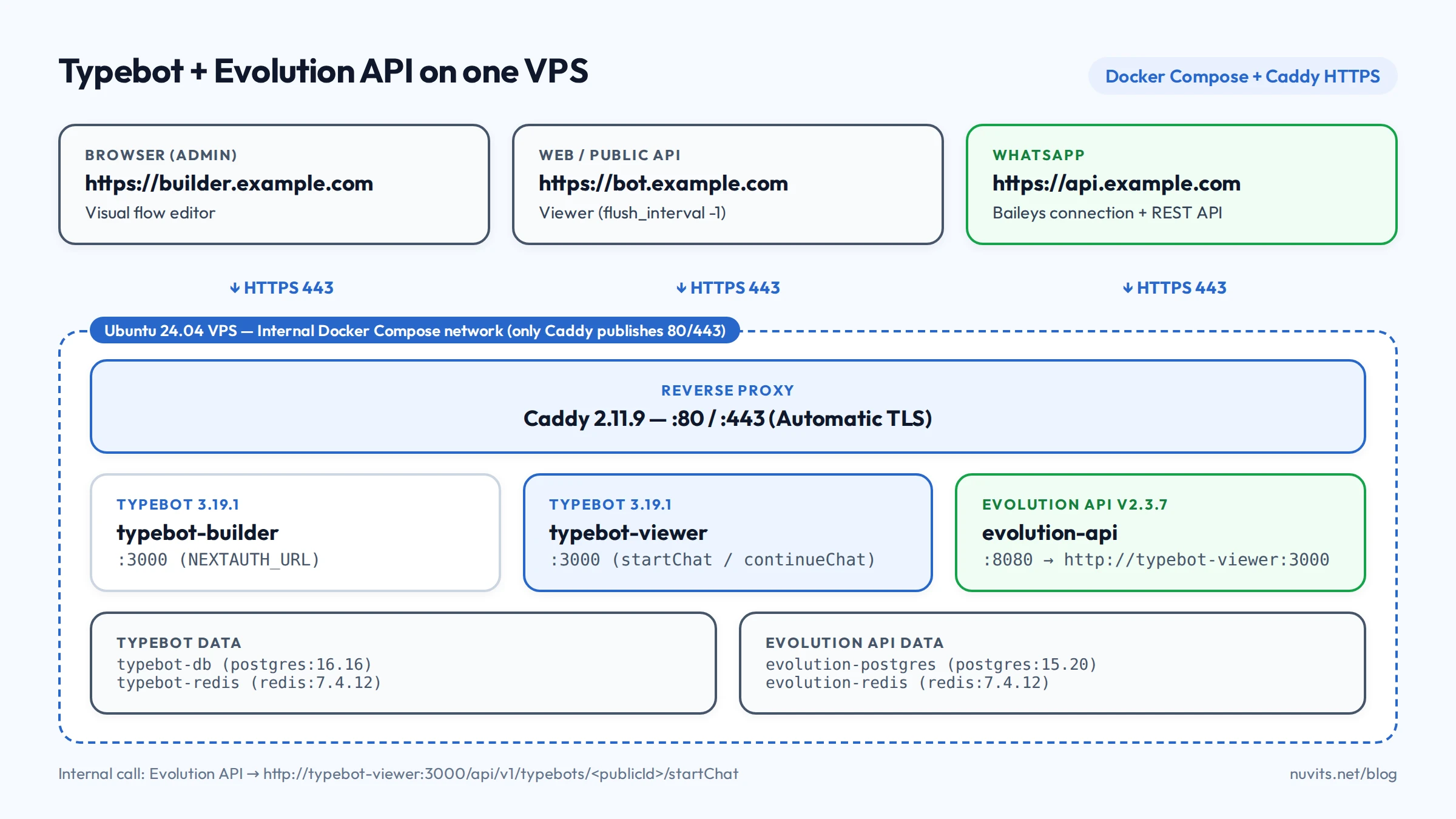
Prepare the files
Create the project directory. Its name becomes the prefix for Docker volumes:
mkdir -p ~/typebot-whatsapp && cd ~/typebot-whatsappSecrets and environment variables
Typebot requires a 32-character base64 ENCRYPTION_SECRET. Generate it using the command from the official docs, and generate the remaining passwords in hex:
openssl rand -base64 24 | tr -d '\n' ; echo
openssl rand -hex 16
Run the first command once for ENCRYPTION_SECRET and the second three times: Typebot's Postgres password, Evolution API's Postgres password and AUTHENTICATION_API_KEY. Never reuse placeholder keys from repository examples.
Create .env with your domains, database credentials, SMTP settings for Typebot and the Evolution API key:
BUILDER_DOMAIN=builder.example.com
VIEWER_DOMAIN=bot.example.com
EVOLUTION_DOMAIN=api.example.com
[email protected]

TYPEBOT_VERSION=3.19.1
TYPEBOT_ENCRYPTION_SECRET=paste-your-32-char-base64-secret
[email protected]
TYPEBOT_POSTGRES_USER=typebot
TYPEBOT_POSTGRES_PASSWORD=paste-typebot-db-password
TYPEBOT_POSTGRES_DB=typebot

SMTP_HOST=smtp.example.com
SMTP_PORT=587
SMTP_USERNAME=smtp-user
SMTP_PASSWORD=smtp-password
NEXT_PUBLIC_SMTP_FROM='Typebot <[email protected]>'
SMTP_SECURE=false

EVOLUTION_API_KEY=paste-evolution-api-key
EVOLUTION_POSTGRES_USER=evolution
EVOLUTION_POSTGRES_PASSWORD=paste-evolution-db-password
EVOLUTION_POSTGRES_DB=evolution_db
Restrict file permissions:
chmod 600 .envDetails that prevent common first-boot failures:
TYPEBOT_ENCRYPTION_SECRETmust match on both Builder and Viewer. Rotating it later breaks active sessions and stored credentials inside flows.TYPEBOT_ADMIN_EMAILassigns theUNLIMITEDworkspace plan when you sign up with that email, avoiding the 200-chat cap of theFREEplan.- Stick to hex database passwords (
openssl rand -hex 16) or percent-encode@,:,/and#inside connection URIs. - If you prefer Google or GitHub OAuth instead of SMTP magic links, replace the SMTP block with
GOOGLE_AUTH_CLIENT_IDandGOOGLE_AUTH_CLIENT_SECRET(callback athttps://builder.example.com/api/auth/callback/google), as documented in Typebot configuration.
Caddyfile
Create Caddyfile in the same folder. Adding flush_interval -1 to the Viewer block follows Typebot's Docker documentation so streamed messages are not buffered by the reverse proxy:
{
	email {$ACME_EMAIL}
}

{$BUILDER_DOMAIN} {
	reverse_proxy typebot-builder:3000
}

{$VIEWER_DOMAIN} {
	reverse_proxy typebot-viewer:3000 {
		flush_interval -1
	}
}

{$EVOLUTION_DOMAIN} {
	reverse_proxy evolution-api:8080
}
Docker Compose
This file builds on the official Typebot v3.19.1 Compose file (which includes Redis) and the Evolution API v2.3.7 Compose setup, dropping the external Dokploy network and passing explicit environment variables to each service:
x-typebot-common: &typebot-common
  restart: always
  depends_on:
    typebot-db:
      condition: service_healthy
    typebot-redis:
      condition: service_healthy
  environment:
    DATABASE_URL: postgresql://${TYPEBOT_POSTGRES_USER}:${TYPEBOT_POSTGRES_PASSWORD}@typebot-db:5432/${TYPEBOT_POSTGRES_DB}
    REDIS_URL: redis://typebot-redis:6379
    ENCRYPTION_SECRET: ${TYPEBOT_ENCRYPTION_SECRET}
    NODE_OPTIONS: --no-node-snapshot
    NEXTAUTH_URL: https://${BUILDER_DOMAIN}
    NEXT_PUBLIC_VIEWER_URL: https://${VIEWER_DOMAIN}
    ADMIN_EMAIL: ${TYPEBOT_ADMIN_EMAIL}
    SMTP_HOST: ${SMTP_HOST}
    SMTP_PORT: ${SMTP_PORT}
    SMTP_USERNAME: ${SMTP_USERNAME}
    SMTP_PASSWORD: ${SMTP_PASSWORD}
    NEXT_PUBLIC_SMTP_FROM: ${NEXT_PUBLIC_SMTP_FROM}
    SMTP_SECURE: ${SMTP_SECURE}

services:
  caddy:
    image: caddy:2.11.9
    restart: unless-stopped
    ports:
      - "80:80"
      - "443:443"
      - "443:443/udp"
    environment:
      BUILDER_DOMAIN: ${BUILDER_DOMAIN}
      VIEWER_DOMAIN: ${VIEWER_DOMAIN}
      EVOLUTION_DOMAIN: ${EVOLUTION_DOMAIN}
      ACME_EMAIL: ${ACME_EMAIL}
    volumes:
      - ./Caddyfile:/etc/caddy/Caddyfile:ro
      - caddy_data:/data
      - caddy_config:/config
    depends_on:
      - typebot-builder
      - typebot-viewer
      - evolution-api

  typebot-db:
    image: postgres:16.16
    restart: always
    environment:
      POSTGRES_USER: ${TYPEBOT_POSTGRES_USER}
      POSTGRES_PASSWORD: ${TYPEBOT_POSTGRES_PASSWORD}
      POSTGRES_DB: ${TYPEBOT_POSTGRES_DB}
    volumes:
      - typebot_db:/var/lib/postgresql/data
    healthcheck:
      test: ["CMD-SHELL", "pg_isready -U ${TYPEBOT_POSTGRES_USER} -d ${TYPEBOT_POSTGRES_DB}"]
      interval: 5s
      timeout: 5s
      retries: 10

  typebot-redis:
    image: redis:7.4.12
    restart: always
    command: redis-server --save 60 1 --loglevel warning
    volumes:
      - typebot_redis:/data
    healthcheck:
      test: ["CMD-SHELL", "redis-cli ping | grep PONG"]
      start_period: 20s
      interval: 15s
      timeout: 3s
      retries: 5

  typebot-builder:
    <<: *typebot-common
    image: baptistearno/typebot-builder:${TYPEBOT_VERSION}

  typebot-viewer:
    <<: *typebot-common
    image: baptistearno/typebot-viewer:${TYPEBOT_VERSION}

  evolution-postgres:
    image: postgres:15.20
    restart: always
    environment:
      POSTGRES_USER: ${EVOLUTION_POSTGRES_USER}
      POSTGRES_PASSWORD: ${EVOLUTION_POSTGRES_PASSWORD}
      POSTGRES_DB: ${EVOLUTION_POSTGRES_DB}
    command: ["postgres", "-c", "max_connections=1000"]
    volumes:
      - evolution_postgres:/var/lib/postgresql/data
    healthcheck:
      test: ["CMD-SHELL", "pg_isready -U ${EVOLUTION_POSTGRES_USER} -d ${EVOLUTION_POSTGRES_DB}"]
      interval: 5s
      timeout: 5s
      retries: 10

  evolution-redis:
    image: redis:7.4.12
    restart: always
    command: redis-server --port 6379 --appendonly yes
    volumes:
      - evolution_redis:/data

  evolution-api:
    image: evoapicloud/evolution-api:v2.3.7
    restart: always
    depends_on:
      evolution-postgres:
        condition: service_healthy
      evolution-redis:
        condition: service_started
    environment:
      SERVER_URL: https://${EVOLUTION_DOMAIN}
      AUTHENTICATION_API_KEY: ${EVOLUTION_API_KEY}
      DATABASE_PROVIDER: postgresql
      DATABASE_CONNECTION_URI: postgresql://${EVOLUTION_POSTGRES_USER}:${EVOLUTION_POSTGRES_PASSWORD}@evolution-postgres:5432/${EVOLUTION_POSTGRES_DB}?schema=evolution_api
      DATABASE_CONNECTION_CLIENT_NAME: evolution
      CACHE_REDIS_ENABLED: "true"
      CACHE_REDIS_URI: redis://evolution-redis:6379/6
      CACHE_REDIS_PREFIX_KEY: evolution
      TYPEBOT_ENABLED: "true"
      TYPEBOT_API_VERSION: latest
      TELEMETRY_ENABLED: "false"
      LOG_LEVEL: ERROR,WARN,INFO,LOG,WEBHOOKS
      LANGUAGE: en
    volumes:
      - evolution_instances:/evolution/instances

volumes:
  caddy_data:
  caddy_config:
  typebot_db:
  typebot_redis:
  evolution_postgres:
  evolution_redis:
  evolution_instances:
Two evolution-api lines matter most and are easy to miss:
TYPEBOT_ENABLED: "true": Evolution API ships withfalsein.env.example. Without enabling it, every/typebot/*request fails with400 Bad Request(Typebot is disabled).TYPEBOT_API_VERSION: latest: tells Evolution API to call the current Typebot endpoints (/api/v1/typebots/<slug>/startChatand/api/v1/sessions/<id>/continueChat) instead of the legacy/api/v1/sendMessagepath.
If your flows need image or file uploads, configure S3-compatible storage (such as MinIO or Cloudflare R2) using the Typebot S3 guide. Text flows, choice menus and variable collection work without S3.
Start and verify the three domains
Before starting, confirm builder.example.com, bot.example.com and api.example.com resolve to the VPS IPv4 address and that ports 80 and 443 are open. Then start the stack:
cd ~/typebot-whatsapp
sudo docker compose up -d
sudo docker compose ps
On first boot, typebot-builder and evolution-api apply Prisma migrations to their PostgreSQL databases. Follow the logs until both report ready:
sudo docker compose logs -f typebot-builder typebot-viewer evolution-apiCheck all three endpoints over HTTPS:
curl -fsS -I https://builder.example.com
curl -fsS -I https://bot.example.com
curl -fsS https://api.example.com
api.example.com returns JSON with version 2.3.7 and Evolution API's welcome message. If a certificate fails to issue, inspect sudo docker compose logs caddy and double-check DNS records.
Build and publish a Typebot flow
- Open
https://builder.example.comand sign in with the email set inTYPEBOT_ADMIN_EMAIL. - Create a new flow (for example, a greeting bubble followed by a choice input).
- Click Publish in the top-right corner. Unpublished drafts do not answer on the Viewer API.
- Open the Share tab and copy the bot's public ID (the slug right after
https://bot.example.com/, such aswhatsapp-support).
Once your admin account exists, add DISABLE_SIGNUP: "true" to x-typebot-common in docker-compose.yml and recreate the Builder (sudo docker compose up -d typebot-builder) so strangers cannot register on your server.
Verify that the Viewer API answers before wiring Evolution API:
curl -fsS -X POST https://bot.example.com/api/v1/typebots/whatsapp-support/startChat \
  -H "Content-Type: application/json" \
  -d '{}'
If the response contains sessionId and a messages array with your first bubble, Typebot is ready.
Connect Evolution API to Typebot
Load .env into your shell session so you do not have to paste keys manually:
cd ~/typebot-whatsapp
set -a && . ./.env && set +a
1. Create the WhatsApp instance and pair it
Create the instance with WHATSAPP-BAILEYS (Evolution API's docs note that the WhatsApp Web connection can have limitations compared with Meta's official Cloud API):
curl -fsS -X POST "https://${EVOLUTION_DOMAIN}/instance/create" \
  -H "apikey: $EVOLUTION_API_KEY" \
  -H "Content-Type: application/json" \
  -d '{"instanceName":"support","integration":"WHATSAPP-BAILEYS","qrcode":false}'
Fetch the QR code and scan it from WhatsApp on your phone under Linked devices:
curl -fsS "https://${EVOLUTION_DOMAIN}/instance/connect/support" \
  -H "apikey: $EVOLUTION_API_KEY"
2. Set default session behavior
POST /typebot/settings/<instance> sets expiration, finish keywords and human-handoff behavior for the instance:
curl -fsS -X POST "https://${EVOLUTION_DOMAIN}/typebot/settings/support" \
  -H "apikey: $EVOLUTION_API_KEY" \
  -H "Content-Type: application/json" \
  -d '{
    "expire": 20,
    "keywordFinish": "#exit",
    "delayMessage": 1000,
    "unknownMessage": "I did not understand that. Type #exit to end the chat.",
    "listeningFromMe": false,
    "stopBotFromMe": true,
    "keepOpen": false,
    "debounceTime": 3,
    "ignoreJids": ["@g.us"]
  }'
What each field controls in Evolution API v2.3.7:
expire: idle timeout in minutes before a session resets.keywordFinish: word that closes the current session (#exit).stopBotFromMe: true: pauses the bot when a human agent replies from the same WhatsApp account.listeningFromMe: false: stops outgoing messages from the bot's own number from triggering the flow.ignoreJids: ["@g.us"]: ignores WhatsApp group chats and answers direct messages only.
3. Attach the published flow
Register the bot on the instance with url pointing to the Viewer on the internal Docker network (http://typebot-viewer:3000, with no trailing slash) and typebot set to the flow's public ID:
curl -fsS -X POST "https://${EVOLUTION_DOMAIN}/typebot/create/support" \
  -H "apikey: $EVOLUTION_API_KEY" \
  -H "Content-Type: application/json" \
  -d '{
    "enabled": true,
    "description": "Main support flow",
    "url": "http://typebot-viewer:3000",
    "typebot": "whatsapp-support",
    "triggerType": "keyword",
    "triggerOperator": "contains",
    "triggerValue": "hi",
    "expire": 20,
    "keywordFinish": "#exit",
    "delayMessage": 1000,
    "unknownMessage": "I did not understand that. Type #exit to end the chat.",
    "listeningFromMe": false,
    "stopBotFromMe": true,
    "ignoreJids": ["@g.us"]
  }'
To trigger on every incoming message instead of a keyword, change triggerType to "all" and drop triggerOperator and triggerValue.
Confirm the bot was saved:
curl -fsS "https://${EVOLUTION_DOMAIN}/typebot/find/support" \
  -H "apikey: $EVOLUTION_API_KEY"
Variables prefilled automatically
When Evolution API opens a session via startChat, it automatically passes these keys inside prefilledVariables:
remoteJid: the contact's WhatsApp JID (for example[email protected]).pushName: the contact's WhatsApp display name.instanceName: the instance name (support).serverUrl,apiKeyandownerJid: instance metadata.
Define matching variables inside your Typebot flow if you want to greet users with {{pushName}} or send {{remoteJid}} to a webhook or CRM.
Backups and updates
Persistent state lives in the two PostgreSQL databases, the evolution_instances volume (WhatsApp sessions) and .env. Dump both databases and archive the session volume:
cd ~/typebot-whatsapp
set -a && . ./.env && set +a
sudo docker compose exec -T typebot-db pg_dump -U "$TYPEBOT_POSTGRES_USER" "$TYPEBOT_POSTGRES_DB" > typebot-$(date +%F).sql
sudo docker compose exec -T evolution-postgres pg_dump -U "$EVOLUTION_POSTGRES_USER" "$EVOLUTION_POSTGRES_DB" > evolution-$(date +%F).sql
sudo docker run --rm --volumes-from "$(sudo docker compose ps -q evolution-api)" -v "$PWD":/backup ubuntu:24.04 tar czf /backup/evolution-instances-$(date +%F).tar.gz /evolution/instances
Copy the .sql dumps, the .tar.gz archive and .env off the VPS. A backup that stays on the same disk disappears with the server.
To upgrade Typebot or Evolution API, take a backup first, read the GitHub release notes, update the pinned tag in .env or docker-compose.yml and recreate the containers:
cd ~/typebot-whatsapp
sudo docker compose pull
sudo docker compose up -d
Upgrading PostgreSQL across major versions (16 or 15) requires a dump and restore rather than a tag bump.
Next steps
- If WhatsApp is paired but the bot stays silent, check the troubleshooting guide Evolution API Typebot bot not replying on WhatsApp.
- To pick a server for this stack, see VPS for Evolution API or Docker VPS.